The Productivity Problem: A Really Long Editorial

I like searching the internet for other people who are making autonomous lawn mowers. You can learn a lot by seeing how others are approaching the problem. Over the years, I’ve found several folks who’ve made great progress. Yet everywhere I look I still see people on riding mowers cutting their grass the same old-fashioned way. What gives?

When I started the mower project, the problem I was solving seemed blindingly obvious. Mowing is unpleasant to do personally and expensive to hire out. Let’s build a machine that mows a lawn without a human. It will sell itself!

Both Greenzie and Mowbotix did just that. They built machines that can mow huge fields with great precision. Why haven’t they conquered the lawn care industry with their cutting-edge technology? The answer, in my humble opinion, has nothing to do with the maturity or sophistication of their technology. It has everything to do with productivity.

If you think back to economics 101, you’ll recall that productivity is the amount of output you get for a given input. For an autonomous lawn mower to be successful in the marketplace, it has to not only remove the operator from the machine but increase productivity while doing so.
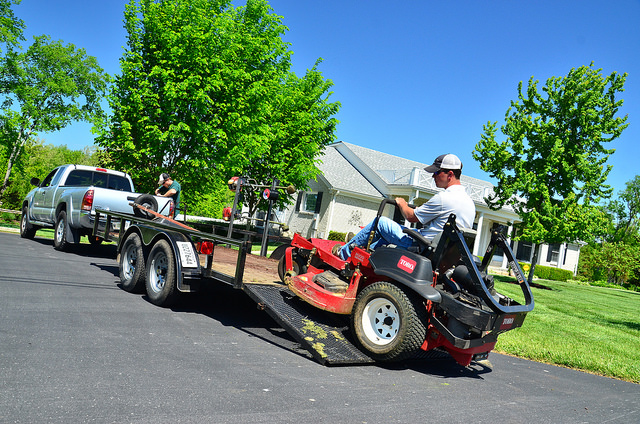
Joe’s Mowing Company.

And therein lies the problem. To illustrate, imagine a fictitious Joe’s Lawn Care company, who is using standard lawn care technology available today. A typical day for Joe would go something like this:

  1. Joe drives to the job site he needs to mow.
  2. He unloads his mower, hops on, and starts cutting grass.
  3. When he’s finished, he loads the mower back on the trailer and drives to the next job site.
  4. He repeats steps 1 through 3 until he’s finished with the day’s work.

If Joe were to upgrade to an autonomous lawn mower, his day would look like this:

  1. Joe drives to the job site he needs to mow.
  2. He unloads his mower, opens his laptop, loads a mission, and starts cutting grass.
  3. When he’s finished, he loads the mower back on the trailer and drives to the next job site.
  4. He repeats steps 1 through 3 until he’s finished with the day’s work.

How much does an autonomous lawn mower improve Joe’s productivity? The answer: none. And that’s being generous.

Joe gets paid to be out there monitoring the autonomous lawn mower, even if he’s sitting in the truck sipping iced tea while it cuts the grass. He still needs to transport the mower to the job site, unload, and load it. In this light, an autonomous lawn mower doesn’t reduce Joe’s labor costs at all. In fact, it probably increases them because the setup time at each job site will be longer than the time it takes to hop on a riding mower.

And on top of that, an autonomous lawn mower will likely cost much more than a typical riding mower. To give you an idea of how much, I’ll direct you here and here. Essentially, Greenzie and Mowbotix are asking you to bring them your existing mower, $5,000, and they’ll retrofit it for autonomy.

The worst part? To use their solution, you need to pay a significant monthly fee. Wasn’t the whole point of this exercise to get rid of the monthly fee, i.e. the wages you pay the guy to run mower? Talk about back to square one. If that’s how we’re going to market the solution I understand why autonomous lawn mowers haven’t caught on yet.

Framing this information in productivity terms, the inputs for an autonomous mower solution:

  1. Cost thousands of dollars more than an ordinary riding mower.
  2. Still require a worker to setup, monitor, and load up when finished.
  3. Require a significant monthly fee to operate.

On the output side, you get to use your same riding mower at the same speed to cut the same amount of grass as before. And that assumes it doesn’t take longer to get the autonomous mower up and running once you’re at the job site.

I’m going to be honest, this has been a tough post to write because the solution I’m working on suffers from many of these same issues. I don’t intend to disparage Greenzie or Mowbotix: both of them have way cooler robots that are much more robustly autonomous than mine.

But as they exist today, these autonomous mowing solutions, mine included, cost more than traditional lawn mowing technology and result in about the same level of output. We’ve been solving the wrong problem, or a very small part of a much bigger problem.

Removing the operator from the machine is a step in the right direction, but to truly increase lawn care productivity it’s going to take more than a mower that can drive itself. I will be doing some pondering on that over the next few days.

I’ll leave you with a quote I wish I’d found back when Rod sold me the electric wheel chair many years ago:

It doesn’t matter how fast you move if it’s in a worthless direction. Picking the right thing to work on is the most important element of productivity and usually almost ignored. So think about it more!

Sam Altman

Please leave your thoughts below. I’d love to hear them!
A Better RTK Fix

Previously I was using GPS blending between a u-Blox NEO-M8N and a ZED-F9P. When the F9P had an RTK fix solution, all was well. But after losing the RTK fix, the position estimate reverted to the inferior M8N position solution.

So I conducted a few experiments to see if there was a way to get a better position estimate. I realized while tweaking parameters that the final position estimate is what we’re really trying to improve, not just the quality of our RTK fix from the F9P module. A better RTK fix will help our position estimate, but that’s only part of the equation.

Instead of feeding arbitrary coordinates into the base F9P module, this time I let it survey in with a precision of 2.5m and a time of 300s. I was surprised how close to the map imagery the survey in solution was. It was off by ~18in would be my guess.

I started by unplugging the M8N module, but unfortunately the compass is also powered by the 5V and GND pins on the data cable. So with both modules active, I set the GPS_AUTO_SWITCH parameter to 3, so that only the second GPS, the F9P, would be used.

This was a great way to test things because the flight controller was still logging the M8N data, but it wasn’t used for computing the robot’s position.

I was skeptical that this change would actually improve things because the F9P maintains an RTK fix only intermittently at best. But the results surprised me.

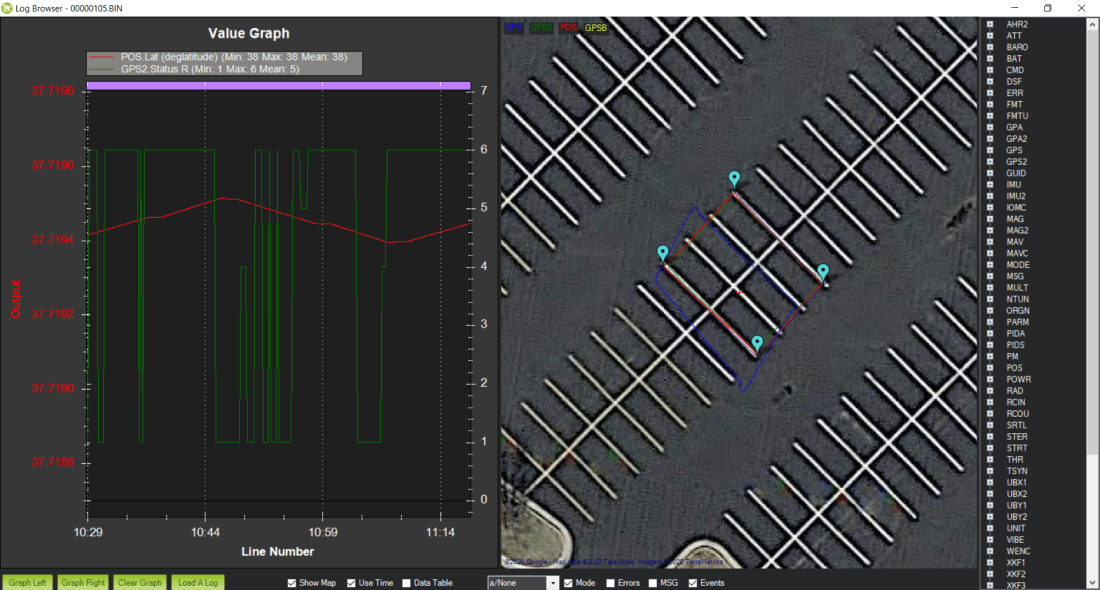
without rtk fix good pos
An excellent position estimate even with spotty RTK fixes.

The Ardupilot software has some magic in it (meaning code I don’t currently understand) that allows the rover to continue with high accuracy even without a GPS solution at times. I think the wheel encoders are helping significantly in this regard but I can’t say for certain.

And related, the blue line is the M8N position accuracy. It’s really terrible. At times it’s a parking stall width, about 2m, from the RTK fix position. In hindsight, I was corrupting a really good position solution by blending it with a solution that was always off by at least 2m.

I looped the same square mission about 20 times and placed screwdrivers on the asphalt at the center of the robot’s travel to mark it’s path and check its repeatability. I would estimate the path drifted ~4in over the 20 loops.

Here’s a picture of the first few loops of the mission. Even with some hiccups in the RTK fix solution, the overall position estimate is very good.

multiple loops
Several loops of the square mission. Even with some bad position data from the ZED-F9P module (green track) the position estimate (red track) is still rock solid.

I didn’t realize it until I started reviewing the logs, but the cell phone battery pack that I was using to power the base F9P module went to sleep after about 10 loops. That means no RTCM stream from the base, which means no RTK fix at the rover. But even without an RTK fix for 10 loops, the position solution was still very good.

no rtk
The position solution with only a 3D Fix from the ZED-F9P. The red track is still solid.

In hindsight, the repeatability could be even better than ~4in that I was seeing if we could have intermittently re-established an RTK fix during that time.

Moral of the story: don’t ruin a really good answer (RTK fix) by averaging it with a really bad answer (3D fix).

A Day in the Parking Lot

IMG_1532
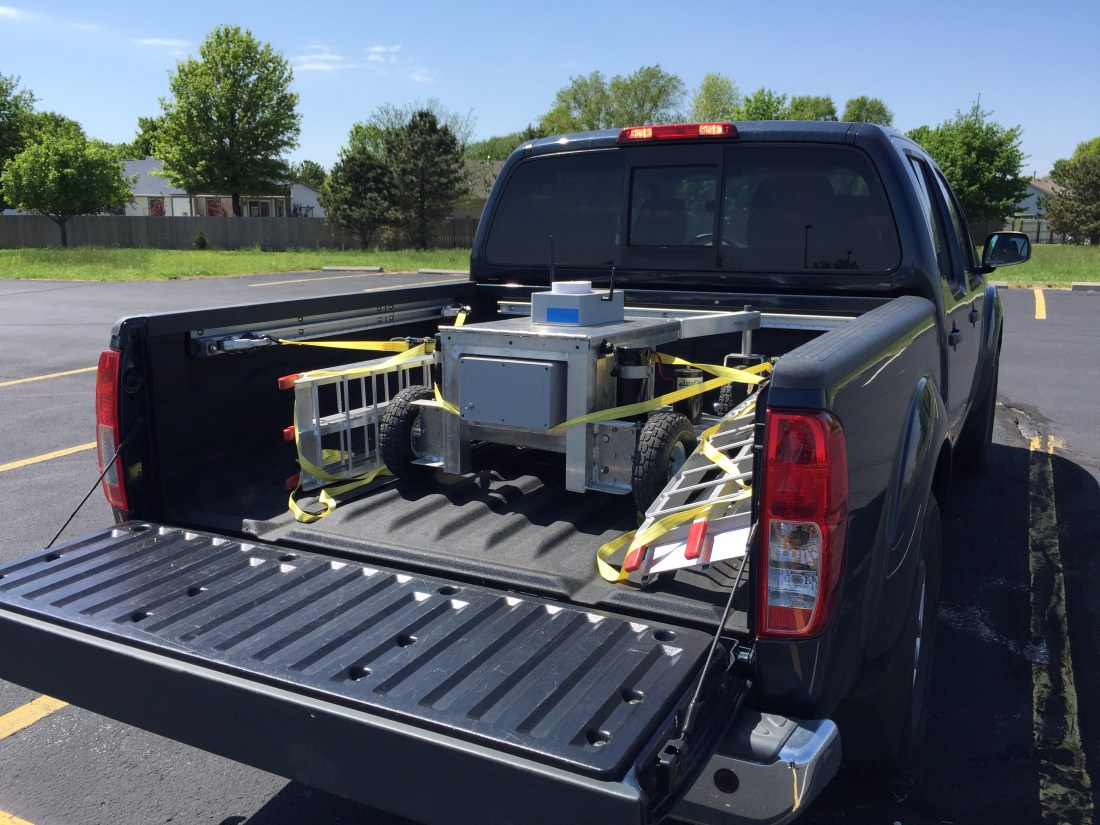
Transporting the robot lawn mower. With the lead acid batteries installed, it weighs close to 300lb.

Late last year I traded in the Honda for a small truck. As I was designing the robot lawn mower it quickly became apparent that it wouldn’t fit in my little sedan. And even if it could, I’m not sure how I would load and unload a machine that weighs 300lb by myself.

I thought about taking it apart to transport it and then putting it back together in the field. But that is a very inefficient way to do business. The Honda had a great run, it was 16 years old and needed a new timing belt so I figured it was time to upgrade.

I’m a big fan of goals. For my afternoon in the parking lot, here was my to do list:

  1. Figure out the best way to load and unload the robot mower into the truck.
  2. Install my new wheel encoders and make sure they are working robustly.
  3. Play with the RTK GPS modules.
  4. Take the robot into some tall grass and see how it performs.

I realized that I have a few more things I need to bring to the field with the new robot lawn mower, so I updated my checklist of things to bring or do prior to leaving the house:

  1. Cell phone with cellular data and enough storage space for several videos and photos
  2. AA batteries for the RC transmitter
  3. Make sure rover batteries are sufficiently charged
  4. The toolbox with hex wrenches, adjustable wrench, and screwdrivers
  5. Multimeter
  6. Laptop with a good battery charge
  7. Telemetry radio for the laptop
  8. SD card, installed in the Pixhawk
  9. RTK GPS receiver, antenna, and micro USB cable for power
  10. Rechargeable batteries for RTK GPS base station
  11. Prefetch any map data that will be needed in Mission Planner
  12. Preplan any missions that may be needed and save the waypoint files

I typically would have gone to an actual field, but a parking lot offers some really nice geostationary markers that show up on satellite imagery: parking stripes.

IMG_1534
The parking lot. Wide open skies, flat pavement, and geostationary lines. A perfect laboratory for implementing the RTK GPS modules.

My neighbor saw me using chunks of plywood to load the robot in the truck. He had some tailgate ramps he wasn’t using and let me borrow them for the day. I think I’m going to make him an offer for them. They were tremendously easy to use and transport.

The roof of a car makes for an awesome ground plane, so I decided to set up the RTK GPS base station on top of the truck. I noted which parking stall I was in and then found that same stall on the map imagery in Mission Planner and fed those coordinates to the ZED-F9P module.

To get a feel for how the RTK GPS was performing, I ran a circle mission.

perfect circle mission
A circle mission in the parking lot with RTK GPS.

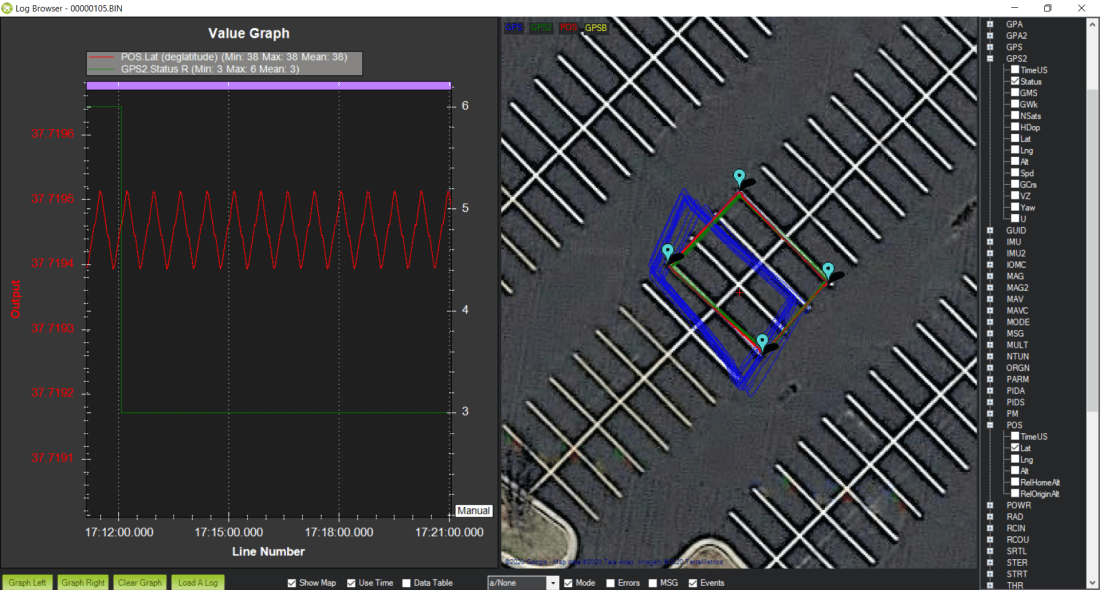
On the map, the green line is GPS2, the position solution from the ZED-F9P module on the rover. The blue line is GPS1, the NEO-M8N module. My understanding is the red line is the EKF’s estimation of position after fusing sensor data with the GPS data.

The blue line is offset from the green line, even though their paths are pretty similar. I think this is because I arbitrarily selected the location of the base module. Essentially, I’m using two different origins: one for the RTK GPS versus whatever the M8N uses. This poses a problem when you lose the RTK fix.

bad gps
An example of how the position solution from the EKF jumps when RTK fix is lost.

The ZED-F9P module doesn’t lose the RTK fix gracefully. It frequently goes from RTK fix to no solution. After a few seconds though it usually returns to an RTK fix. But once it’s lost, the EKF replaces the F9P position solution with the M8N’s solution. Which is off by a few feet.

You can see an example of this behavior in the picture above. The position is heavily weighted to the F9P solution, but once it’s lost, it jumps immediately to the M8N solution. Interestingly, when the F9P reports an intermediate solution such as 3D fix, the weighting behavior is more of an average between the two receivers.

I double checked my parameters and GPS_AUTO_SWITCH = 2, so the EKF should be blending solutions, not just using the most accurate solution of the two. And when both receivers are in 3D fix mode, that’s the behavior you see.

I have some questions based on these observations:

  1. Is GPS blending really that useful? Maybe I should just ditch the M8N module all together. Whenever you have an RTK fix, it seems like this solution is so superior that the EKF basically ignores the M8N solution.
  2. For GPS blending, would an additional RTK GPS help? The reported accuracies from two identical modules would be similar. Maybe the redundancy would help when an RTK fix is lost on one receiver.
  3. Why does the EFK assume the robot’s position suddenly jumps? This is a rover, not a quadcopter. Especially when you have wheel encoders and an IMU, you should be able to assume that the robot’s position isn’t drifting significantly due to external disturbances, even if the GPS position jumps.
  4. If we could eliminate the offset between the two solutions by using the same “datums” would that make the failover more graceful?

Some of those questions can be turned into experiments I can conduct the next time I’m out in the field:

  1. Disable the NEO-M8N module. How does the robot respond when the ZED-F9P module loses an RTK fix?
  2. Instead of arbitrarily setting the coordinates of the RTK base module, we can let it “survey in” to determine its location. This may eliminate some of the offset between the F9P and M8N position solutions.
  3. We can measure the offset between the F9P and M8N solutions and then adjust the coordinates of the RTK base module to compensate. This would minimize the position jump between solutions when RTK fix is lost.

I also took the robot out into some taller grass to see how it would perform. You can see a video of it here. I also took a time-lapse of a typical grid run. Overall not bad, but for striping grass, it’s not good enough.

Going forward it looks like I will need ways to obtain a better position solution. I don’t think RTK GPS will get us there entirely. There are some exciting visual odometry solutions out there I may look into.

Rotary Encoder Troubleshooting

I’ve managed to fry three rotary encoders on the left motor now. The first one was when I discovered the issue. The second one was when I switched the left and right encoders to try and see if the issue was specific the encoder or something else. And the third one was a spare 900CPR encoder I plugged in just to see if it would work.

When I write computer code, I’m pretty cavalier about testing it. If I get an error, I just go back to the code and tweak it. The computer typically doesn’t go up in smoke if I forget a parenthesis or colon.

On the robot lawn mower, however, there are consequences for this kind risk taking. Installing a new encoder in a scenario where I’ve just watched one get fried is, well, pretty stupid. The results are predictable.

Because they’re not particularly cheap, I decided it would be best to sit down and figure out exactly why the encoders keep breaking. To summarize the symptoms:

  1. Only the encoder on the left motor breaks. The encoder on the right motor works fine.
  2. After installing a new encoder on the left motor, it will work fine for a while, but eventually stops working.
  3. When an encoder fails, it will oscillate around the zero point by a few counts. It still outputs data, it’s just really crappy data.

After installing the encoders and building the drive motor assemblies, I bench tested the encoders. I wanted to make sure I caught any issues before I installed them on the mower. They worked great at the time, but I only applied 12V to the motors. They receive 24V the way they’re wired in the robot lawn mower.

So my initial hypothesis was that perhaps the current sent through the motor wires was inducing current in the adjacent encoder wires. Maybe at 12V it’s not enough to matter, but with 24V, it causes an issue. The maximum current rating for the E5 encoders I’m using is 85mA, not much. But if this were the case, you would think the same issue would present itself on the right motor. They’re wired identically, but the right motor works just fine. So that can’t be the problem.

After tracing my wire runs and verifying everything worked, I was at a loss as to what was causing the issue. So I took apart the motor to see if something weird was going on inside.

IMG_5569
Encoder signal sires inside the cap of the motor housing. No wonder I kept frying encoders. The purple wire was to the A input of the encoder.

Well, a nicked signal wire could definitely cause an issue.

The two brass extrusions on the left and right side of the picture are for seating the motor brushes. With all the exposed, energized metal in this area it wouldn’t surprise me if the wire made contact with something and fried the encoder.

I’m guessing I pinched the wire when I installed the cap. It’s pretty tight in there and you kind of have to hammer it into place. You’d have no idea something got pinched until, well, the encoders stopped working.

After replacing the encoder wires and rebuilding the motor, I used the 900CPR encoder to make sure things were working. So far so good. Hopefully I’m done buying rotary encoders for a while.